Request Sampling
Tideways provides several ways that allow you to reduce the number of requests made to an organization to control which tier you end up with.
This process is called sampling and reduces the amount of data that Tideways looks at for signals of performance issues and errors.
| Errors, Exceptions or Triggered Traces that occur in non-sampled requests are not reported to Tideways. This may lead to skewed statistics, important traces or errors missing and to no notifications sent for these errors. |
On the Enterprise plan, there is the option to pay based on the number of transactions/endpoints and get unlimited requests. Reach out to [email protected] if this is an option you want to discuss.
The following options are available for request sampling:
-
For Business and Enterprise plans starting with the 15M Tier, you can configure a global sampling rate through the organization settings or let Tideways automatically adjust the sampling rate to your monthly limit. You can access this from the "Sampling" sub-page on the organization settings screen.
-
You can ignore endpoints and transactions that are not providing valuable requests, such as health checks, either from the UI or through the Profiler PHP API.
-
Deactivate a whole service so that no requests are recorded for it. This only works for non-default services.
-
Disable data transmission for a selected server from the project settings > server screen.
-
Implement your own sampling strategy in code using the Profiler PHP API.
Global Request Sampling Settings
Via the Organization settings screen, you can access the "Sampling" settings that provide details on the current sampling strategy and sampling rate.
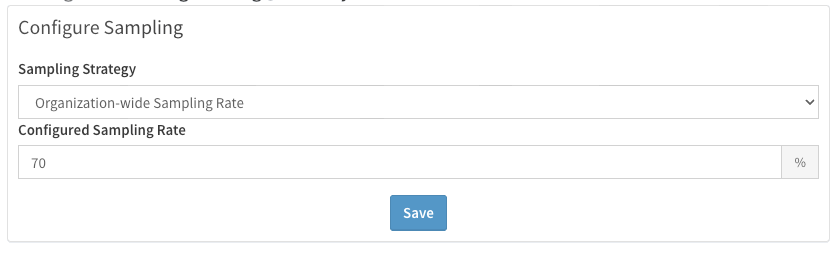
By default no sampling is applied for organizations. Starting with Business and Enterprise plans at the 15 million requests tier or higher, you can configure a sample rate below 100% through this settings screen:
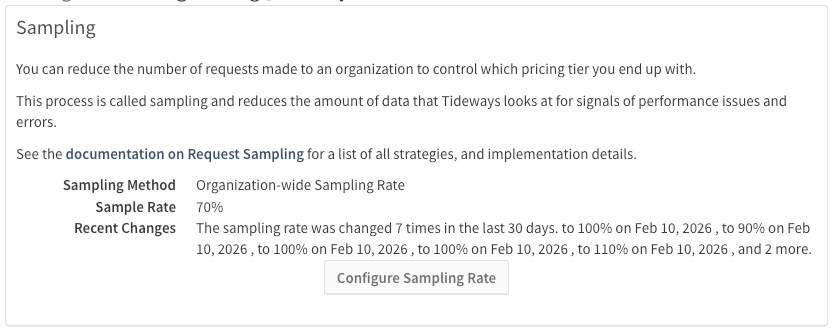
The organization-wide request sampling is the easiest way to configure request sampling, it applies to all projects of the organization equally and only keeps the configured percentage of requests, traces and errors.
Request Sampling in Code
For more flexibility in sampling you should implement it directly in PHP code and keep the organization sampling setting to "Keep All".
<?php

use Symfony\Component\HttpFoundation\Request;

$request = Request::createFromGlobals();

if (class_exists('Tideways\Profiler') &&
    $request->getPathInfo() === '/health' &&
    random_int(0, 99) >= 90) {
    \Tideways\Profiler::ignoreTransaction();
}
The tideways.trace_sample_rate only controls how many full traces are collected
from all requests. It does not reduce the number of requests monitored by Tideways.
|
Sampling Symfony Controllers
When you want to implement sampling based on Symfony controller names, you can implement an Event Listener:
<?php
// src/Event/Listener/TidewaysSamplingListener.php

namespace App\Event\Listener;

use Symfony\Component\EventDispatcher\Attribute\AsEventListener;
use Symfony\Component\HttpKernel\Event\ControllerEvent;

#[AsEventListener(event: 'kernel.controller', method: 'onKernelController')]
class TidewaysSamplingListener
{
    public function onKernelController(ControllerEvent $event): void
    {
        if (!class_exists('Tideways\Profiler')) {
            return;
        }

        $controller = $event->getController();
        $controllerName = '';

        if (is_array($controller) && is_object($controller[0]) && is_string($controller[1])) {
            $controllerName = get_class($controller[0]) . '::' . $controller[1];
        } else if (is_object($controller) && is_callable($controller) && !($controller instanceof Closure)) {
            $controllerName = get_class($controller);
        }

        if ($controllerName === 'App\Controller\ProductController::showAction') {
            // ignore 50% of transactions to this controller
            if (random_int(0, 99) < 50) {
                \Tideways\Profiler::ignoreTransaction();
            }
        }
    }
}
Sampling By Tags
You can sample out traffic from cached pages, when using an application framework that supports Tideways Page Cache APi out of the box:
<?php
// public/index.php

// run application code first
// $application->run();

if (class_exists('Tideways\Profiler') &&
    in_array('cached', \Tideways\Profiler::getTags())) {
    \Tideways\Profiler::ignoreTransaction();
}