Transaction Response Time
| This feature is only available to non-legacy plans from 2023 and later. |
With the transaction response time alerting, you can receive notifications about individual transactions exceeding a configured response time threshold.
The response time threshold configuration for each transaction is given in milliseconds (ms) and is configurable from the transaction settings page.
When Tideways detects an incident for a transaction, a notification can be sent to all of our supported integrations.
Configuration
-
Open the Notifications settings screen in your project
-
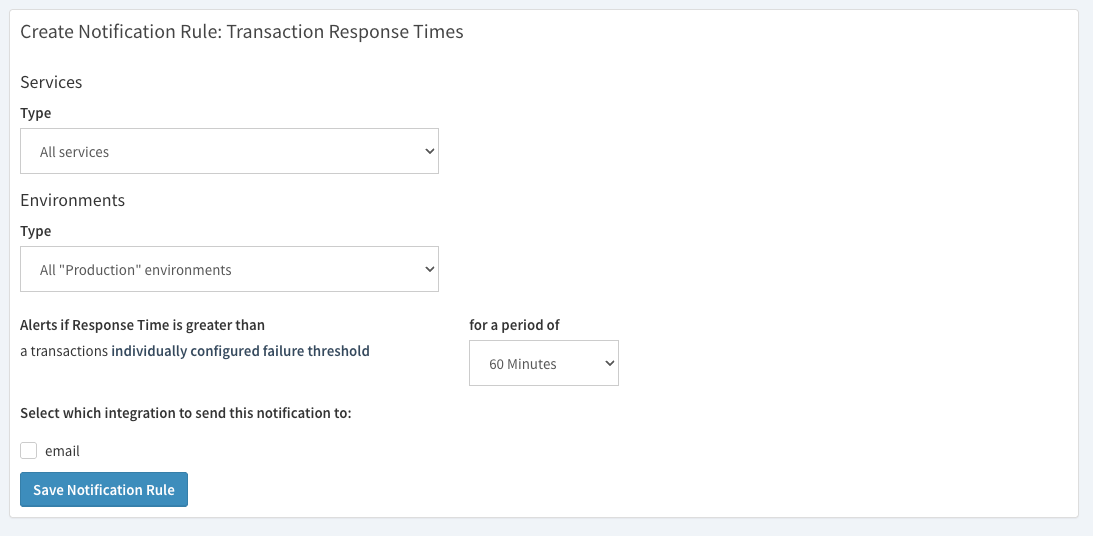
Click "Create Notification Rule" and select "Transaction Response Times"
-
Select Services and Environments to match the alert notification rule. By default, all services of the production environment match.
-
Configure the length of the period that the response time threshold should be checked for. For example, 10 minutes. This applies to all the transactions and should only be set to a low value below 60 or 30 minutes for projects with high traffic on all transactions.
-
Select the integrations to send a notification in case an incident is created.
-
Save the Notification Rule.
-
Open the "Transactions" settings screen and configure the response time threshold for all important transactions that you want to monitor closely. Only transactions with configured response time thresholds are considered.
View Active and Resolved Incidents
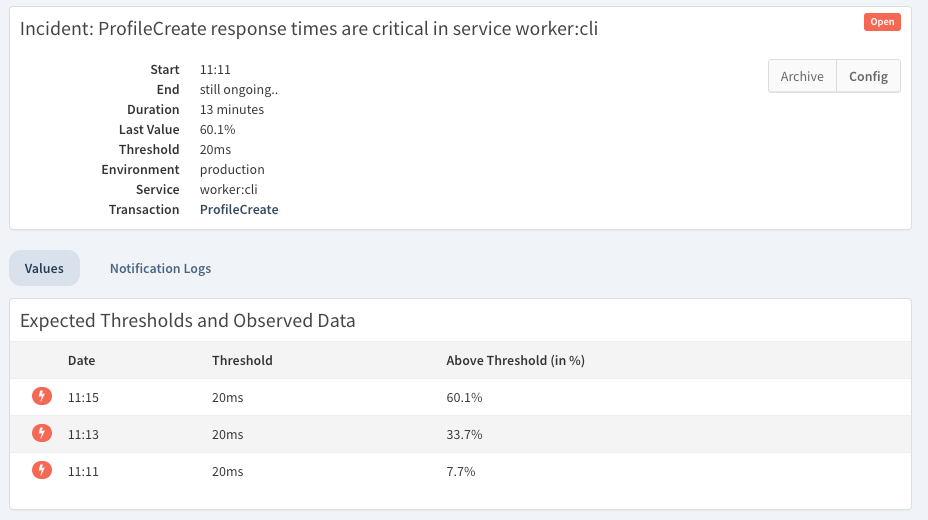
To see a list and details of each incident created by the transaction response time notification rule, open the "Issues" section in your project and select "Incidents".
This shows a list of all open incidents in the currently active service and environment. You can switch services or environments and change the status filter to see all or only resolved incidents.
The details of a transaction response time incident include information about the threshold, the observed values and the duration.
Related
-
Configure Response Time Targets to turn slow requests into failed requests.